APKT vs APMT Inserts: What Is the Difference and Are They Interchangeable?
APKT and APMT milling inserts share the same basic shape, 11° relief-angle designation and hole/chip-form code. Their main designation difference is the third letter: K or M, which identifies the tolerance class.
However, the tolerance letter alone does not tell you whether an insert is designed for aluminum, steel, roughing or finishing. It also does not guarantee that an APKT insert will fit an APMT cutter pocket.
The practical answer is simple: APKT and APMT inserts are not automatically interchangeable. Before replacing one with the other, confirm the complete insert designation, nominal dimensions, mounting hole, cutter pocket, screw, corner radius, chipbreaker and carbide grade.
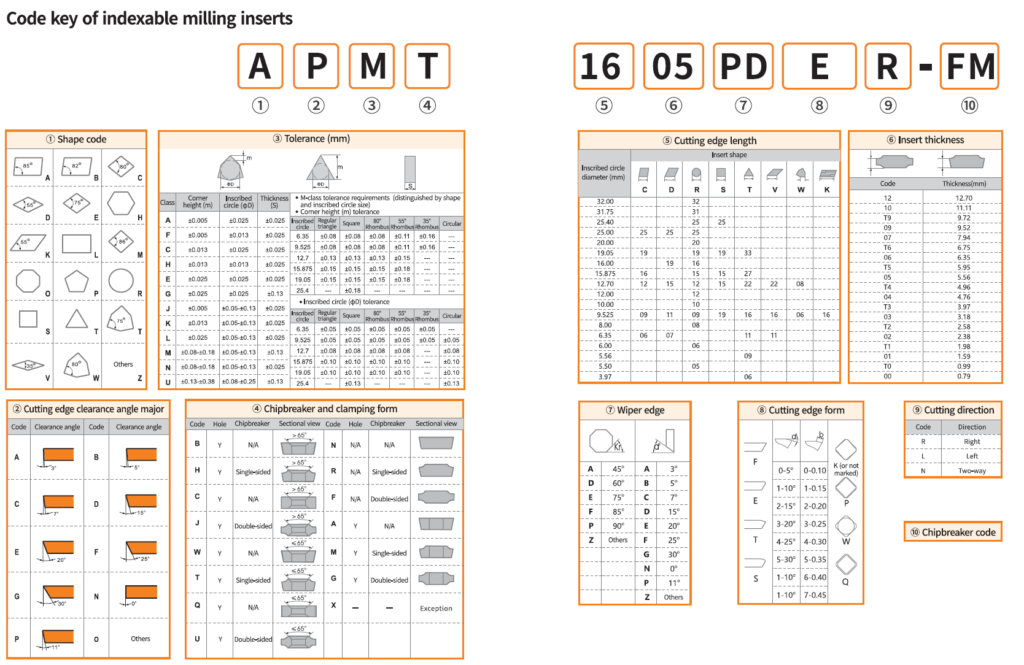
The ISO 1832 designation system assigns the third letter to the tolerance class and defines the relevant dimensions as the inscribed-circle diameter, nose height and insert thickness.
APKT vs APMT: Quick Comparison
| Feature | APKT | APMT |
|---|---|---|
| Basic shape | A: parallelogram-shaped insert | A: parallelogram-shaped insert |
| Relief angle | P: 11° positive relief | P: 11° positive relief |
| Tolerance class | K class | M class |
| Hole and chip-form code | T | T |
| Inscribed-circle tolerance | Size-dependent, generally ±0.05 to ±0.15 mm | Size-dependent, generally ±0.05 to ±0.15 mm |
| Nose-height tolerance | ±0.013 mm | Size-dependent, generally ±0.08 to ±0.20 mm |
| Thickness tolerance | ±0.025 mm | ±0.13 mm |
| Edge sharpness | Not defined by the K letter alone | Not defined by the M letter alone |
| Workpiece material | Determined by geometry, grade and coating | Determined by geometry, grade and coating |
| Roughing or finishing | Determined by the complete model | Determined by the complete model |
| Automatically interchangeable | No | No |
The most important tolerance difference is not the inscribed-circle tolerance, because the published K- and M-class ranges for that dimension are the same. The larger differences appear in nose-height and thickness tolerances. Exact tolerances can also depend on insert size.
Key point: K and M identify tolerance classes. They do not, by themselves, define the carbide grade, coating, chipbreaker, cutting-edge preparation or recommended workpiece material.
What Do APKT and APMT Mean?
The four-letter insert family code provides basic information about the insert.
A — Basic Insert Shape
The first letter identifies the basic shape. In the ISO 1832 designation system, A represents a parallelogram-shaped insert with an 85° included angle.
P — Relief Angle
The second letter identifies the normal relief angle.
P represents an 11° relief angle, which makes APKT and APMT positive-style insert families.
Positive-clearance inserts can reduce cutting forces compared with zero-clearance insert designs, but actual cutting performance still depends on the cutter body, rake geometry, chipbreaker and edge preparation.
K or M — Tolerance Class
The third letter is the main difference between APKT and APMT:
- APKT uses the K tolerance class.
- APMT uses the M tolerance class.
The tolerance class controls permissible variation in selected insert dimensions. It should not be interpreted as a material or application code.
T — Hole and Chip-Form Configuration
In the ISO-style milling code guide used for these insert families, T identifies a screw-hole insert with chip-forming features on one face.
The four letters only identify the basic family. The numbers and suffixes that follow are still needed to identify the complete insert.
The Real Difference: K-Class vs M-Class Tolerance
ISO 1832 uses three principal dimensions when describing these tolerance classes:
- d: nominal inscribed-circle diameter;
- m: nose height or dimensional position of the cutting corner;
- s: insert thickness.
The commonly published tolerance values are:
| Dimension | APKT—K Class | APMT—M Class |
|---|---|---|
| Inscribed-circle diameter, d | ±0.05 to ±0.15 mm, depending on size | ±0.05 to ±0.15 mm, depending on size |
| Nose height, m | ±0.013 mm | ±0.08 to ±0.20 mm, depending on size |
| Thickness, s | ±0.025 mm | ±0.13 mm |
These values explain why K-class inserts provide tighter control of selected dimensions, particularly nose height and thickness.
In a multi-insert milling cutter, dimensional consistency can help control effective cutting-edge height and cutter runout. However, the final surface finish also depends on cutter-pocket accuracy, spindle runout, pocket condition, insert seating, edge geometry and cutting conditions.
For milling inserts, the size and thickness numbers should not be treated as universal dimensions across every manufacturer. The YG-1 milling code guide specifically notes that milling insert size and thickness are not universally standardized in the same way across all product systems. Always use the drawing for the exact manufacturer and complete designation.
What the K and M Letters Do Not Tell You
A common mistake is to assume:
- APKT always means a fully ground, sharp aluminum insert;
- APMT always means a pressed, rounded steel-roughing insert.
These conclusions cannot be made from the third letter alone.
The K or M tolerance class does not independently specify:
- whether every insert surface is ground;
- whether the cutting edge is sharp, honed or chamfered;
- whether the insert is polished;
- whether it is coated or uncoated;
- whether it is intended for steel, stainless steel, cast iron or aluminum;
- whether it is a roughing, semi-finishing or finishing geometry.
Those characteristics are determined by the complete designation, chipbreaker, cutting-edge form, carbide grade, coating and manufacturer’s application data.
For example, an APKT1604 insert with a polished aluminum geometry may be suitable for non-ferrous machining. Another APKT1604 model with a different geometry and grade may be intended for steel or stainless steel. The word “APKT” alone is not enough to make the selection.
[Internal link: use the anchor text APKT insert dimensions, grades and models and link to the APKT product guide.]
[Internal link: use the anchor text APMT insert dimensions and compatible cutters and link to the APMT product guide.]
Are APKT and APMT Inserts Interchangeable?
Not automatically.
Some APKT and APMT models may have matching nominal dimensions, but this does not prove that they are approved for the same cutter body.
Two inserts that look almost identical can still differ in:
- thickness or nose-height tolerance;
- underside seating geometry;
- mounting-hole diameter;
- countersink shape or depth;
- screw position;
- corner radius;
- cutting-edge form;
- right- or left-hand orientation;
- chipbreaker;
- effective cutting-edge position;
- compatibility with the cutter pocket.
An insert should only be treated as interchangeable when the cutter manufacturer or a verified dimensional comparison confirms the substitution.
Compatibility Checklist
Before installing an APKT insert in place of an APMT insert—or the reverse—check all of the following:
- Complete insert designation
Record every letter, number and suffix. Do not compare only “APKT1604” with “APMT1604.” - Cutter-body model
Check the complete marking on the milling cutter or toolholder. - Overall length and insert width
Compare the manufacturer drawings rather than estimating from a photograph. - Insert thickness
A small thickness difference can change seating, screw engagement and cutting-edge height. - Mounting-hole diameter and countersink
Confirm both the hole size and the shape of the screw-contact surface. - Corner radius
Confirm the complete radius code, such as 04, 08, 12 or 16. - Pocket-contact surfaces
The insert must sit fully against the bottom and side location surfaces. - Screw and clamping system
Confirm screw diameter, head shape, length and thread. - Cutting direction and edge form
Check suffixes such as PDER, PEER, PDFR or other manufacturer-specific structures. - Grade and chipbreaker
A physically fitting insert may still be unsuitable for the workpiece material or operation.
Never force an insert into a cutter pocket or use the screw to pull an incorrectly seated insert into position.
APKT1604 vs APMT1604 Dimensions
The 1604 size block is widely used, but it does not guarantee one universal set of dimensions.
In the product catalog currently used for the OnMyToolings APKT and APMT ranges, the following two complete models share the same listed nominal dimensions:
| Complete Model | L | W | T/S | Hole D | Corner Radius |
|---|---|---|---|---|---|
| APKT1604PDER | 17.42 mm | 9.33 mm | 5.20 mm | 4.50 mm | 0.80 mm |
| APMT1604PDER-ZL | 17.42 mm | 9.33 mm | 5.20 mm | 4.50 mm | 0.80 mm |
This is a catalog-specific nominal comparison, not a universal interchangeability statement. The models still use different tolerance classes and different complete designations. Cutter-pocket approval must be confirmed separately.
The same APMT product range also contains other APMT1604 models listed with:
- 17.25 mm overall length;
- 9.25 mm width;
- 4.76 mm thickness;
- 4.40 mm mounting hole;
- several different corner radii.
This shows why ordering an insert using only the words “APMT1604” or “APKT1604” is risky. The complete code and drawing are required.
APKT1135 vs APMT1135 Dimensions
The current APKT and APMT catalog pages also show nominally similar 1135 examples:
| Complete Model | L | W | T/S | Hole D | Corner Radius |
|---|---|---|---|---|---|
| APKT1135PDER | 11.30 mm | 6.25 mm | 3.60 mm | 2.80 mm | 0.80 mm |
| APMT1135PDER-ZL | 11.30 mm | 6.25 mm | 3.60 mm | 2.80 mm | 0.80 mm |
Again, matching nominal dimensions do not automatically confirm cutter compatibility.
The complete APMT1135 range also contains models with slightly different widths and thicknesses. Confirm the exact suffix, dimensions and cutter pocket before ordering.
What About APKT1705 and APMT1705?
Do not assume that APKT1705 and APMT1705 are two names for the same insert.
In the current OnMyToolings catalog, APKT1705-EM is treated as a separate APKT product family with several corner-radius options. The listed models include different radii and, in one case, a different overall length.
A supplier should only describe an APKT1705 model as an APMT1705 substitute when the relevant manufacturer documentation confirms:
- the complete cross-reference;
- all critical dimensions;
- pocket geometry;
- screw compatibility;
- cutting-edge position;
- recommended cutter body.
Similar size numbers or a visually similar shape are not sufficient evidence.
Which Should You Choose: APKT or APMT?
Start with the cutter body—not with a general claim that one family is “better.”
1. Identify the Cutter Pocket
Use the insert family specified by the cutter manufacturer. If the cutter is marked for a complete APKT model, begin with that model. Do the same for APMT.
2. Confirm the Complete Insert Code
Include:
- size;
- thickness or model code;
- corner radius;
- cutting-edge form;
- cutting direction;
- chipbreaker;
- carbide grade.
3. Select the Geometry for the Operation
Choose the geometry based on whether the operation is:
- roughing;
- semi-finishing;
- finishing;
- shoulder milling;
- side milling;
- pocketing;
- ramping;
- face milling.
Do not use the K or M tolerance letter as a substitute for the manufacturer’s geometry recommendation.
4. Select the Grade for the Workpiece Material
Choose the carbide substrate and coating for the actual material:
- steel;
- stainless steel;
- cast iron;
- aluminum and non-ferrous alloys;
- heat-resistant alloys;
- hardened materials.
The correct material direction comes from the grade and geometry combination—not from “APKT” or “APMT” alone.
5. Consider Machine and Setup Stability
Also provide:
- machine power;
- spindle taper;
- cutter diameter;
- tool overhang;
- radial and axial depth of cut;
- coolant condition;
- interrupted or continuous engagement;
- current failure mode.
These details help determine whether a sharper, lower-force geometry or a stronger cutting edge is required.
Why Does an APKT or APMT Insert Not Fit the Cutter?
Several problems can produce an apparent compatibility issue.
The Insert Does Not Sit Flat
Possible causes include:
- incorrect insert family;
- different underside geometry;
- chips or damage in the pocket;
- incorrect hole or countersink;
- wrong insert thickness.
Clean the pocket and compare the exact insert drawing before tightening the screw.
The Screw Does Not Center Correctly
The insert may have a different mounting-hole diameter, countersink or screw-contact position. Do not enlarge the hole or substitute an unverified screw.
One Insert Leaves a Visible Line
Check:
- insert seating;
- pocket damage;
- cutter-body runout;
- mixed insert models;
- insert height variation;
- spindle condition.
Tolerance class can influence dimensional consistency, but it is only one possible cause.
The Cutter Chatters After Changing Inserts
The replacement may have a different rake angle, cutting-edge preparation, chipbreaker or grade even when it physically fits.
Review the complete model and reduce cutting load until the application has been verified.
Frequently Asked Questions
What is the main difference between APKT and APMT?
The main designation difference is the tolerance class. APKT uses the K class, while APMT uses the M class. K-class values provide tighter control of nose height and thickness in the published tolerance table.
What does APKT mean?
APKT is an ISO-style insert family designation:
- A: parallelogram-shaped insert;
- P: 11° relief angle;
- K: K tolerance class;
- T: hole and chip-form configuration.
The numbers and suffixes after APKT are required to identify the complete product.
What does APMT mean?
APMT uses the same basic A, P and T codes, but the third letter is M, identifying the M tolerance class.
Can APKT replace APMT?
Only after the complete dimensions, cutter pocket, hole, screw, radius and cutting-edge position have been verified. Similar appearance or matching size numbers do not prove compatibility.
Is APKT1604 the same size as APMT1604?
Some catalog-specific models have matching nominal dimensions, while other models differ. Always compare the complete designation and manufacturer drawing.
Is APKT better for aluminum?
Not necessarily. A polished, sharp APKT geometry with a suitable non-ferrous grade may work well for aluminum, but the APKT family name alone does not guarantee an aluminum geometry.
Is APMT better for steel?
Not automatically. Many APMT grade and chipbreaker combinations are available for steel, but selection must be based on the complete model, grade, coating and cutting conditions.
Does K mean that the whole insert is precision ground?
K identifies a tolerance class. It should not be used as proof that every surface is ground or that the cutting edge has a particular preparation.
What information should I send when requesting a replacement insert?
- the complete insert code;
- cutter-body model;
- clear photos of the insert and pocket;
- insert dimensions if the code is unreadable;
- screw information;
- workpiece material;
- milling operation;
- required quantity.
Final Recommendation
APKT and APMT inserts belong to closely related positive milling-insert families, but the K and M letters represent different tolerance classes.
Do not select between them using general rules such as:
- APKT is always for aluminum;
- APMT is always for steel;
- APKT is always finishing;
- APMT is always roughing.
Instead, follow this order:
- identify the cutter body;
- record the complete insert designation;
- compare all critical dimensions;
- confirm the pocket and screw;
- choose the chipbreaker and edge geometry;
- select the grade for the workpiece material;
- verify the application before full production.
Need help matching an existing insert? Send us the full insert code, cutter-body model, pocket photos and workpiece material for a compatibility review.